NEW FINAL CUT PRO PLUGINS + APPS

VIEW APPS
LUT Fox · for Final Cut Pro

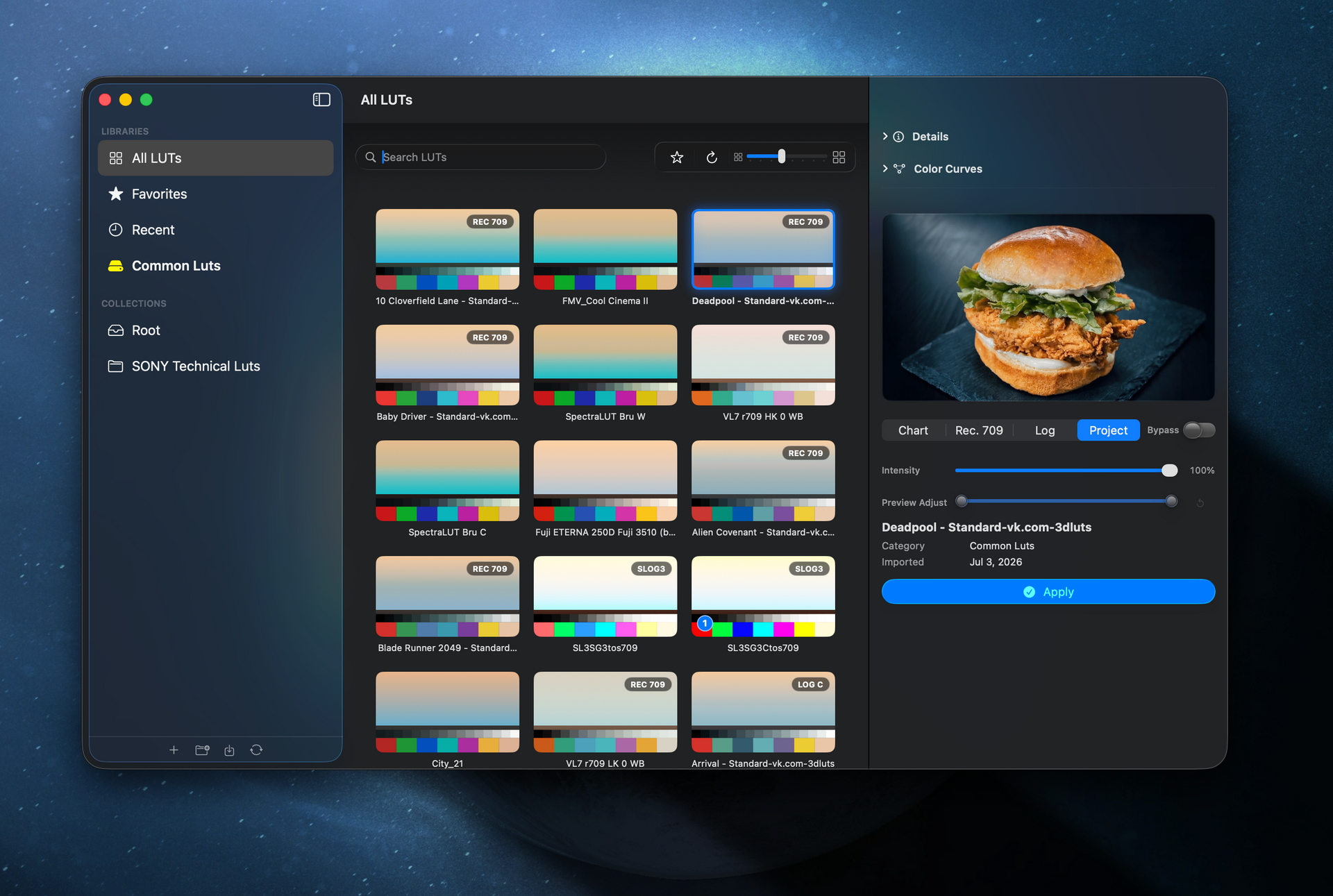
The LUT browser Final Cut never had.

See your whole LUT library as pictures, judge every look on your own footage, and apply it to the clip in one click. After two rug-pulls, we ended the madness.

One-time payment · No subscription · No LUT packs · Your files never touched
AUDIO BROWSE X
Audio Browse X
FCP audio workflow extension · $20 once
LUT FOX
LUT Fox
FCP LUT plugin, browser + power tools · $15 once

1 click

From picture wall to graded clip

4 views

Chart, LOG, Rec. 709 or your frame

$15

Once. Yours for good

33³

Camera-safe cube conversions

Apply on Select
Compare with [ and ]
Preview on your frame
S-Log3 → Rec. 709
Convert for compatibility
.cube · .3dl · .cdl · .cc
Temp before the LUT
Tags · ratings · collections
Export to Desktop
Files never modified
Apply on Select
Compare with [ and ]
Preview on your frame
S-Log3 → Rec. 709
Convert for compatibility
.cube · .3dl · .cdl · .cc
Temp before the LUT
Tags · ratings · collections
Export to Desktop
Files never modified
What it does

See the look before you commit.

Point LUT Fox at your LUT folder once. Every look becomes a picture you can click, sort, tag and send straight to your clip.

Picture wall

Your whole LUT library, as pictures.

Subfolders become collections, and every .cube, .3dl, .cdl and .cc file gets a live thumbnail. Big libraries open instantly.

Apply on select

Audition looks right on the clip.

Tick Apply on Select and every LUT you click lands on your Final Cut clip, at the intensity you set.

Preview types

Chart, LOG, Rec. 709 or your frame.

Project mode pulls a real frame from your timeline, so you judge the look on your footage, not a stock photo.

Compare bin

Flip between looks with [ and ].

Cmd-click LUTs to collect them as tabs, then flip through them on your clip without hunting.

Power tools

Convert, extract, make it camera-safe.

Convert color spaces, extract color or contrast, resample to a 33-point cube your camera accepts, or export a copy to your Desktop.

Two rug-pulls later, we ended the madness. So we built LUT Fox.

Pricing

Pay once. Own it. (No subscription. Ever.)

No subscriptions, no bundled LUT packs, no upsells. One fair price and free fixes until the next genuinely big release.

Audio Browse X
For Final Cut Pro users

LUT Fox

The LUT browser, plus the Final Cut effect that puts your pick on the clip.

  • Browse & organize .cube, .3dl, .cdl and .cc files
  • Preview on a chart, LOG, Rec. 709 or your own frame
  • Apply on Select and a [ ] compare bin
  • Convert color spaces & make camera-safe 33³ cubes
  • Ratings, tags, collections & favorites
Audio Browse X screenshot
LUT Fox
Also from DL&P

Audio Browse X

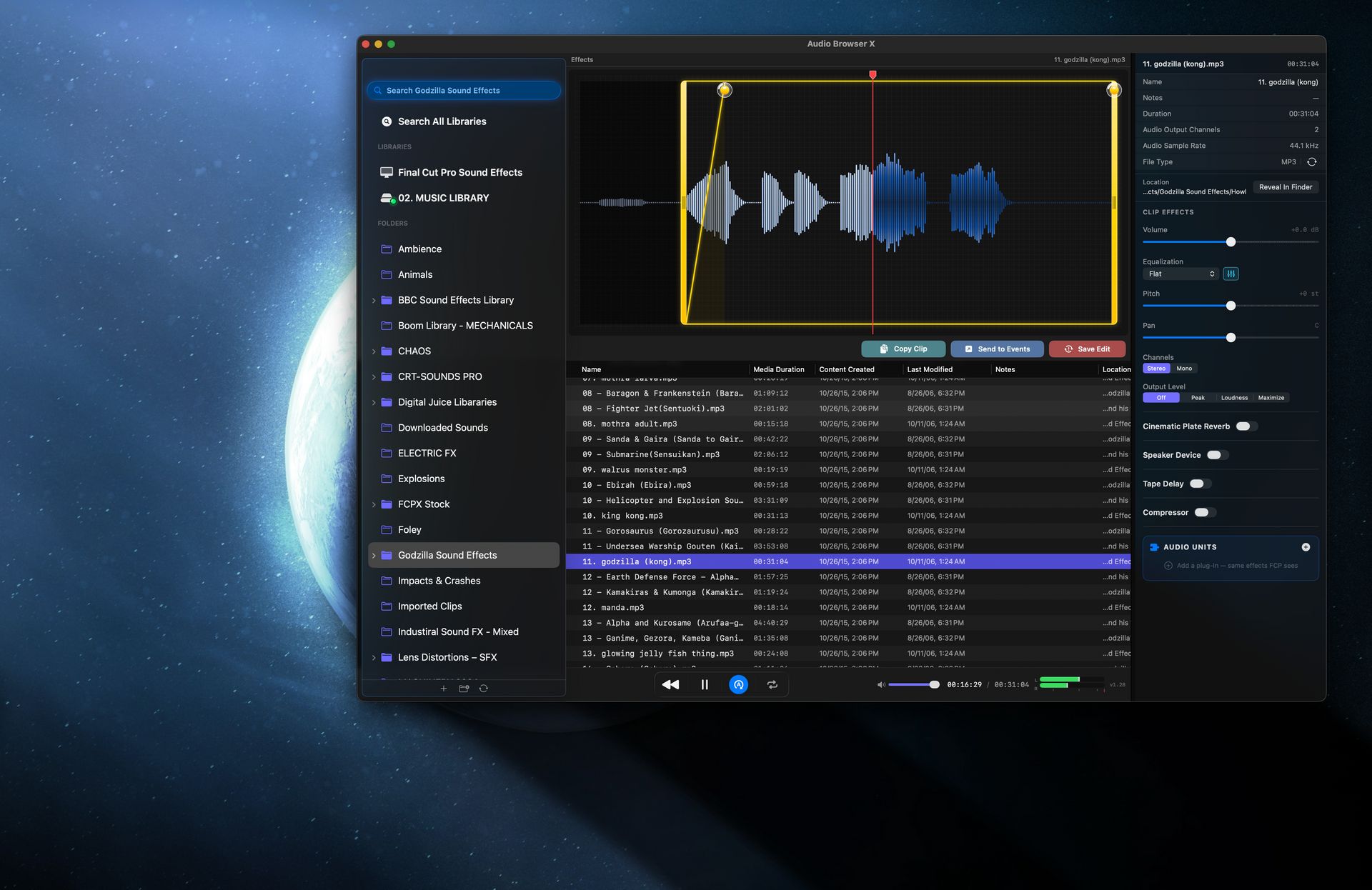
Final Cut’s missing sound browser. Same family, same no-nonsense pricing.

  • Search giant SFX and music libraries instantly
  • Trim, fade, pitch & stack Audio Units
  • Drag straight onto the FCP timeline
  • Launch from FCP’s Extensions menu
LUT Fox screenshot

Please buy a license instead of sharing the app. It keeps independent tools alive. If price is the only thing between you and a tool you need, reach out below. We’d much rather help than see you grab a sketchy download.

The fine print

No bullshit. No subscriptions.

DL&P tools · what you won’t get
● None of this
$9.99/mo

No subscriptions

One price. Yours for good.

LUT pack upsell

No LUT packs

We sell the browser, not the looks.

Overwrite original?

Files never touched

Anything LUT Fox makes is a new file, saved beside the original.

Spinning wheel

Instant launches

Big libraries open immediately; only new LUTs import.

Fake progress

Honest software

Real scan counts, and Apply waits for Final Cut to confirm.

Stock preview

Your footage

Judge looks on a frame from your own timeline.

Rug-pull

Here to stay

We grade with it every day, so we keep it working.

v2: pay again

Free updates

Fixes and upgrades until a truly big release earns it.

Thanks! We’ll keep you posted.

How it works

Drop. Pick. Apply.

Three steps from a folder of .cube files to a graded clip.

01

Drop the effect on a clip

Search “LUT” in Final Cut’s Effects browser and drag LUT Fox onto your clip.

02

Open the browser

Click Open Browser in the inspector and point it at your master LUT folder once.

03

Apply, or audition

Hit Apply, or turn on Apply on Select and click through looks live on the clip.

Get LUT Fox news

New power tools, updates, and the docked workflow-extension version when it lands.

Enter an email Use an address with (@) and (.)
This is required

Something went wrong. Please try again.

Thanks! We got it.

Questions

Quick answers.

What do I need to run it?

macOS 26 or later and Final Cut Pro 11 or later.

Which LUT formats does it read?

.cube, .3dl, .cdl and .cc. Subfolders in your LUT folder become collections.

Will it change my LUT files?

Never. Anything LUT Fox makes is a new file saved beside the original.

My camera rejects a LUT. Can it help?

Yes. Convert for Compatibility resamples it to a 33-point cube cameras accept.

Is this a subscription?

Never. One payment, free updates until the next big release.

Anything else? Ask below. A human at DL&P reads every message.

This is required
Enter an email Use an address with (@) and (.)
What do you need?
This is required
This is required

Something went wrong. Please try again.